Contrails.Aviation operations, unified.
Demos by appointment, on a guided demo operation
Dispatch, duty, maintenance, billing — built for Part 135 charter, management, and owner-flight operators running 1–50+ aircraft.
From first quote to paid invoice.
Most Part 135 operators run a dispatch tool, a crew scheduler, a maintenance tracker, a spreadsheet for duty time, and QuickBooks for billing. The same trip gets typed in four times, the numbers stop agreeing, and invoices go out weeks after the airplane lands.
Contrails replaces that stack with one system of record, and keeps the FAA paperwork clean while it does it.
Operate
Quote → trip → dispatch → release → log → close, in one flow.
Comply
Part 135 duty, currencies, manifest audit, signed releases.
Maintain
Inspections, MELs, squawks, work orders, weight and balance.
Bill
Invoices with FET, block hours, credit ledger, QuickBooks sync.
The modules your team will live in.
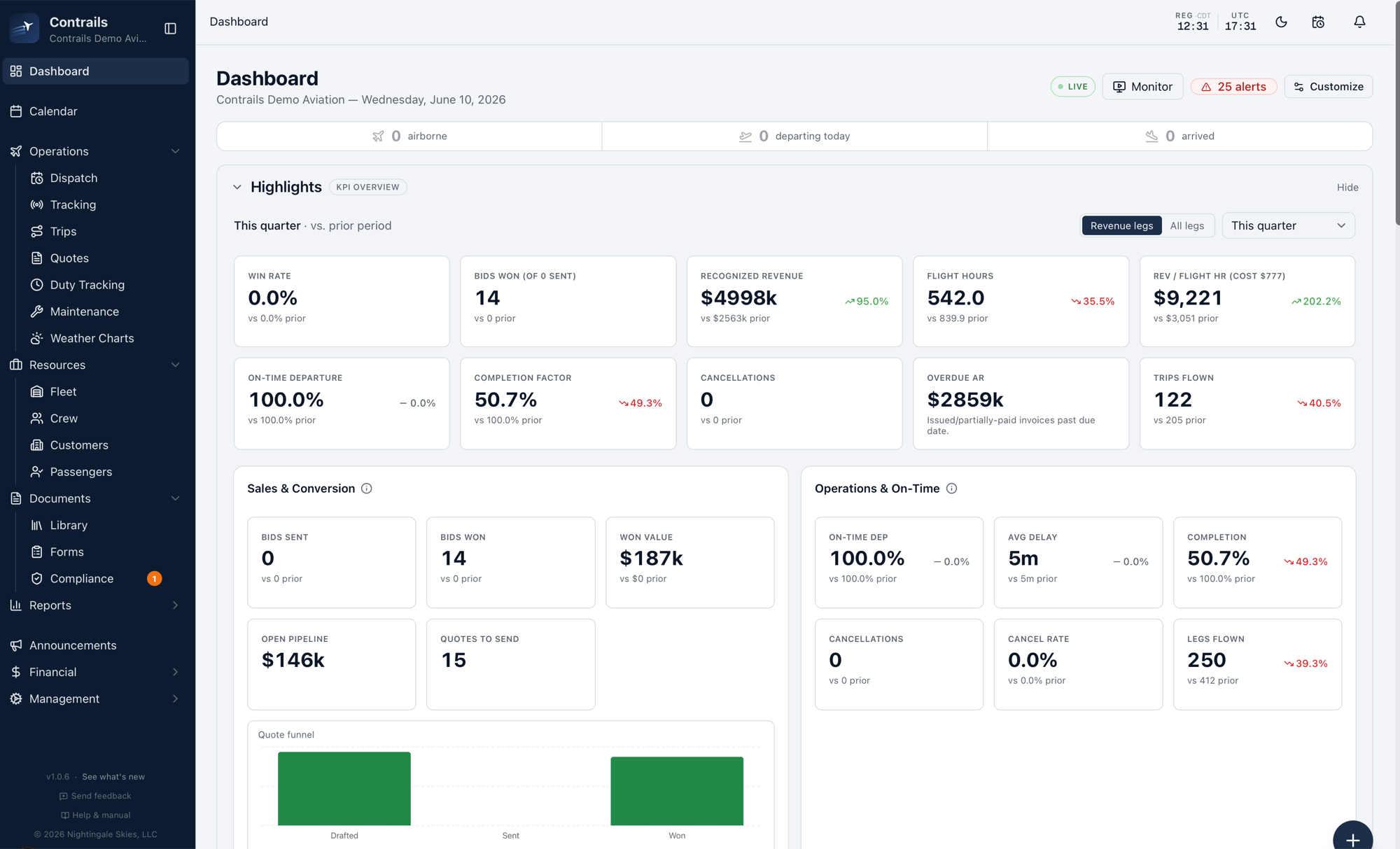
Operations · Dashboard
The dashboard your DO opens at 06:00
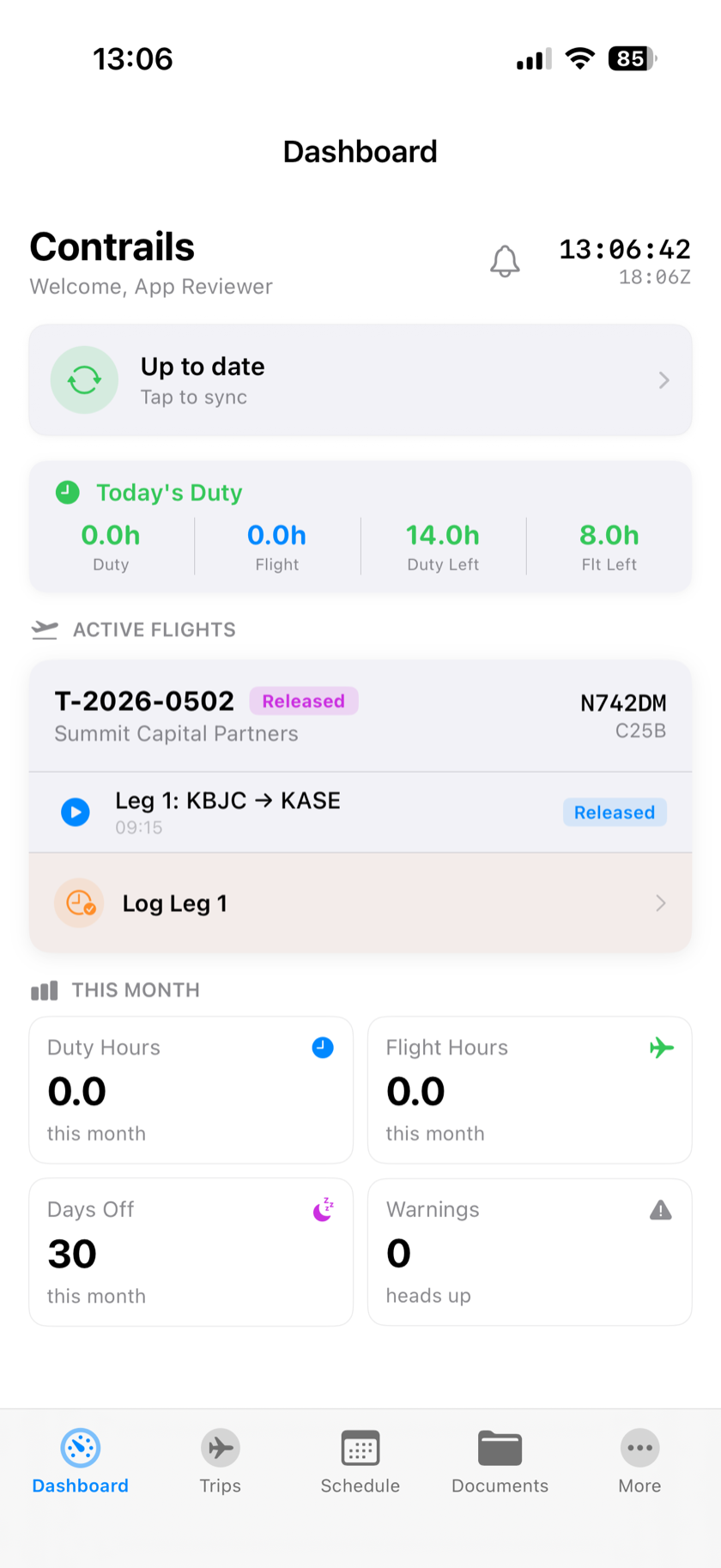
A single screen with the numbers that run the quarter: flight hours, recognized revenue, win rate, on-time departure, completion factor, overdue AR — plus live alerts and everything airborne right now.
- Quarterly KPIs against prior period — revenue, hours, win rate, AR
- Sales and conversion next to operations and on-time, one view
- Live status: airborne, departing today, arrived, alerts
Operations · Trip detail
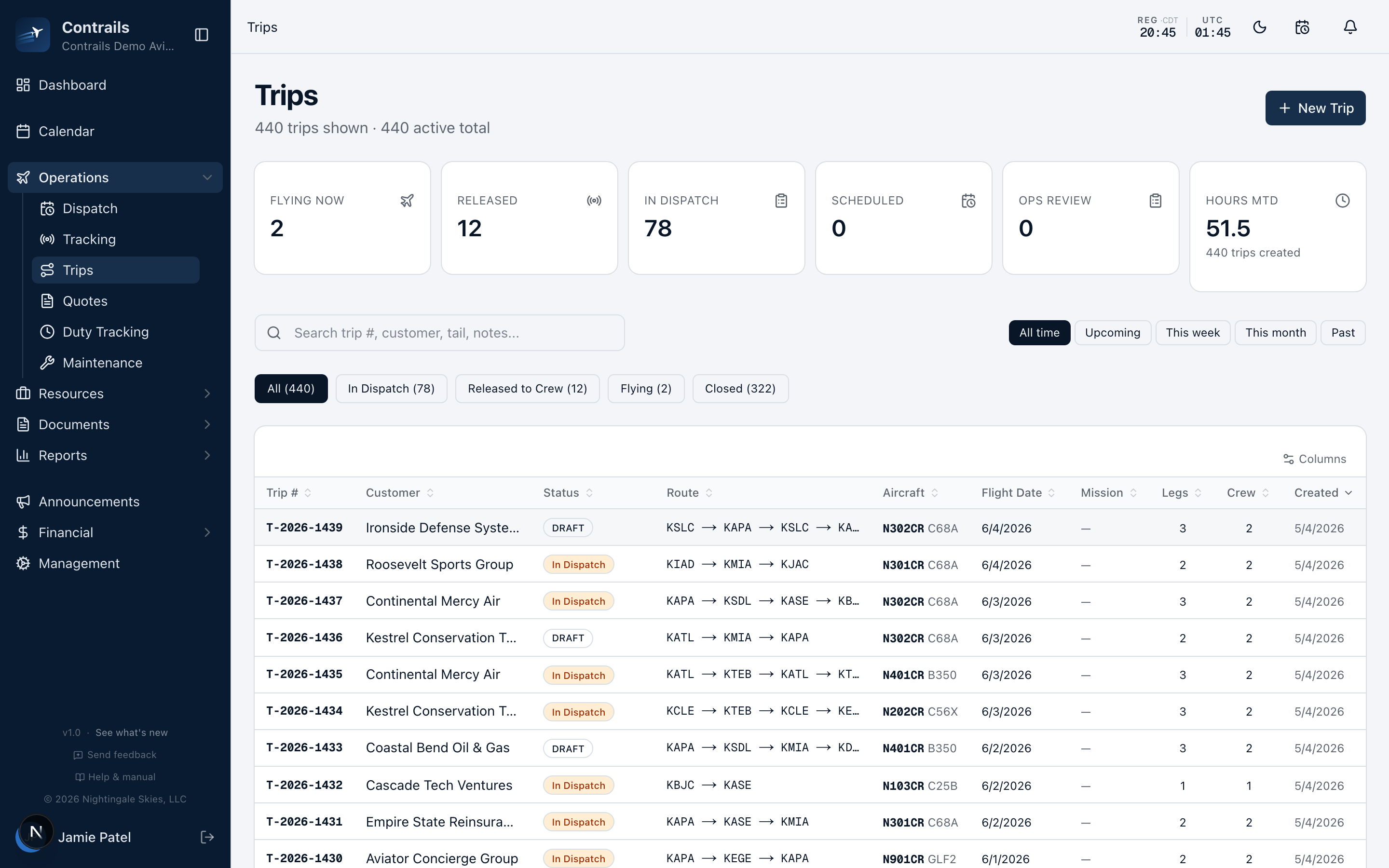
Quote → trip → dispatch → close, in one record
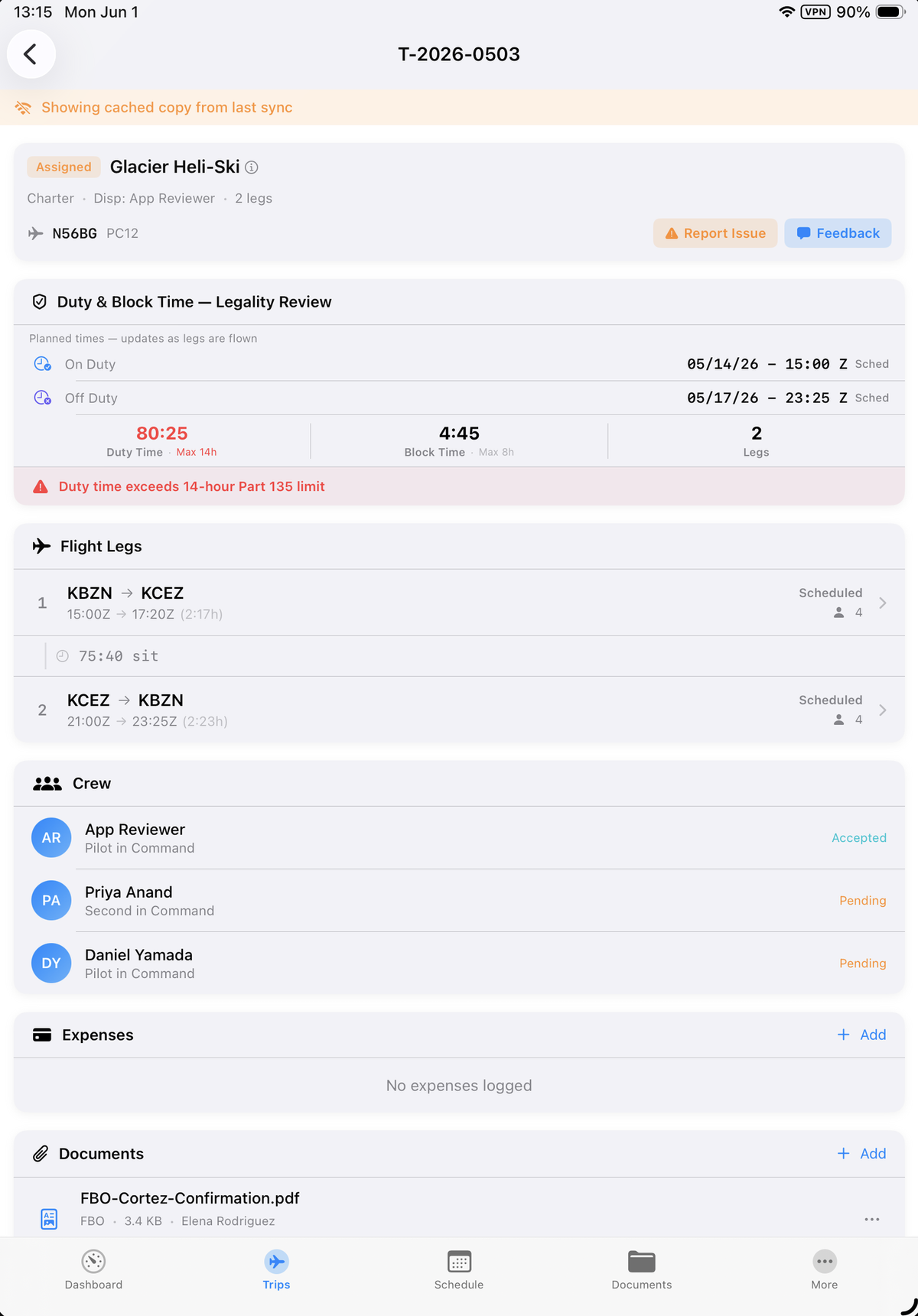
Multi-leg trips that carry crew, aircraft, fuel, weight & balance, NOTAMs, dispatch release, and signed acceptances through to close — and roll straight into invoicing the moment the last leg lands.
- Multi-leg trips with crew assignment and digital signatures
- Dispatch release with weight & balance, fuel, weather, NOTAMs
- Trip → invoice handoff at close, with zero data re-entry
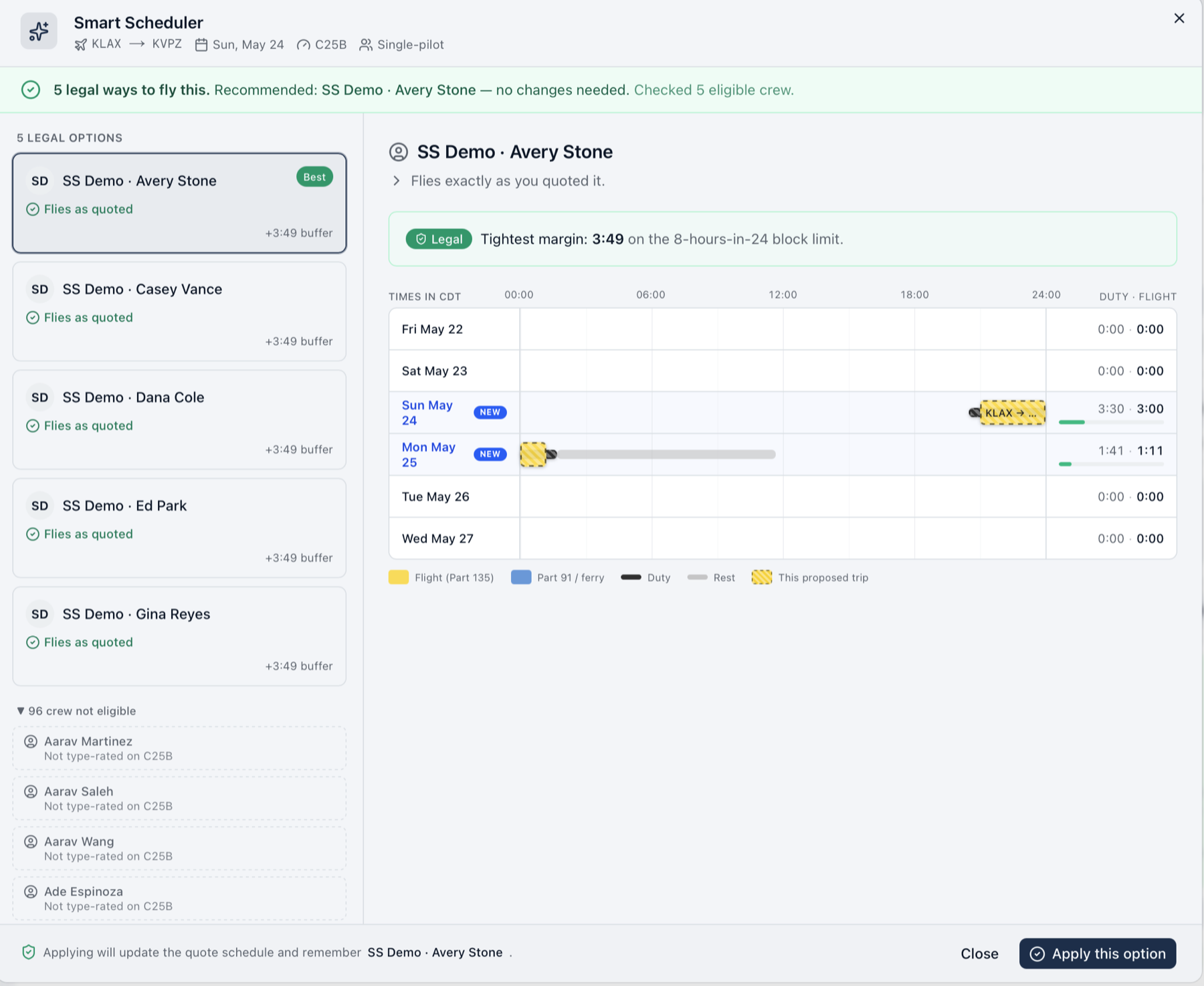
Scheduling · Smart Scheduler
The Smart Scheduler answers the can-we-take-it call
A customer calls about a last-minute trip. The Smart Scheduler checks legality on the spot — duty and rest, crew eligibility, aircraft status — and ranks every legal way to fly it, with the tightest margin shown. The person on the phone can commit or decline while the customer is still on the line.
- Every legal crew and aircraft option, ranked, margins shown
- Duty, rest, and the proposed trip on one timeline
- One tap applies the option to the quote schedule
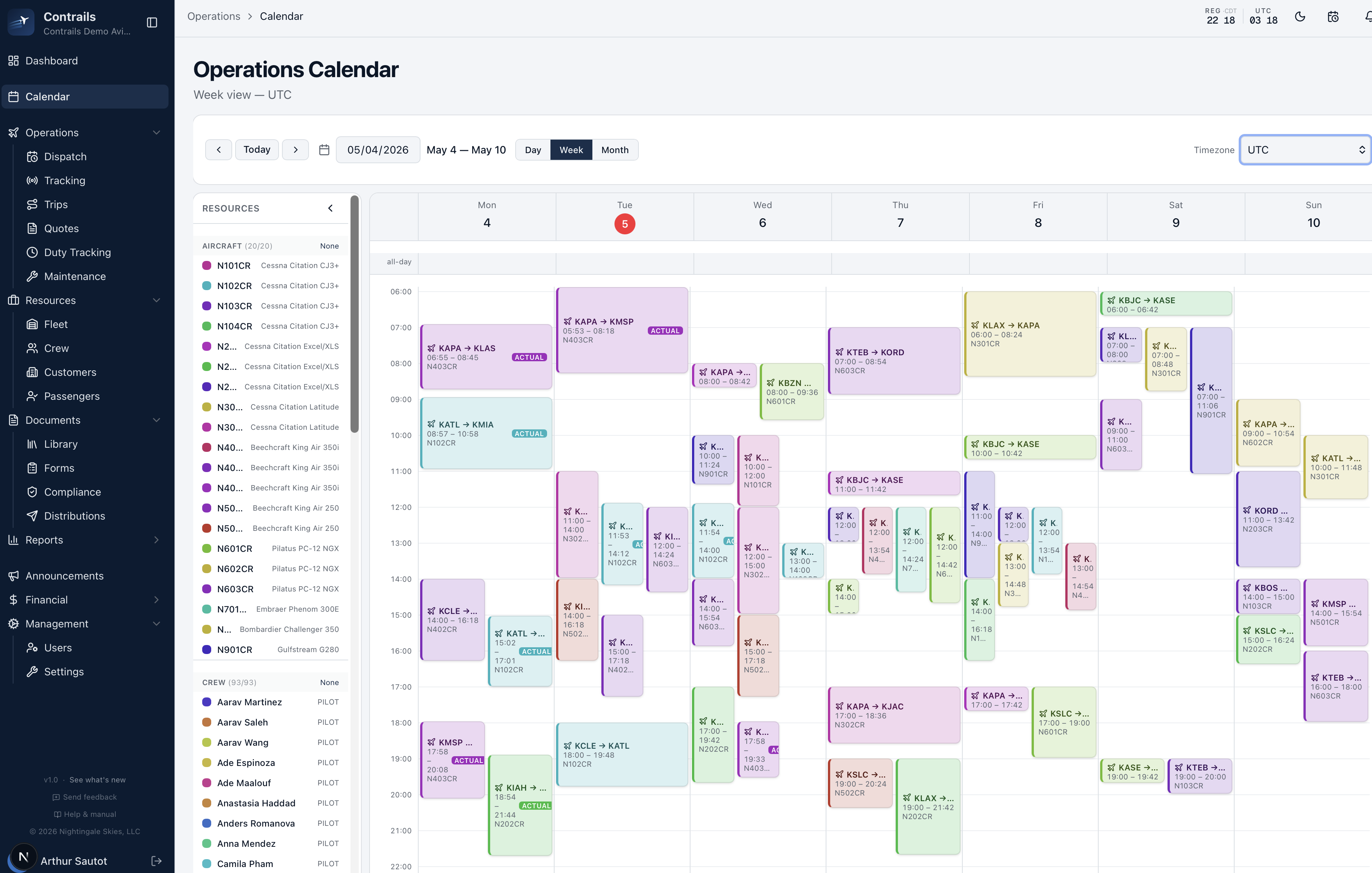
Scheduling · Calendar
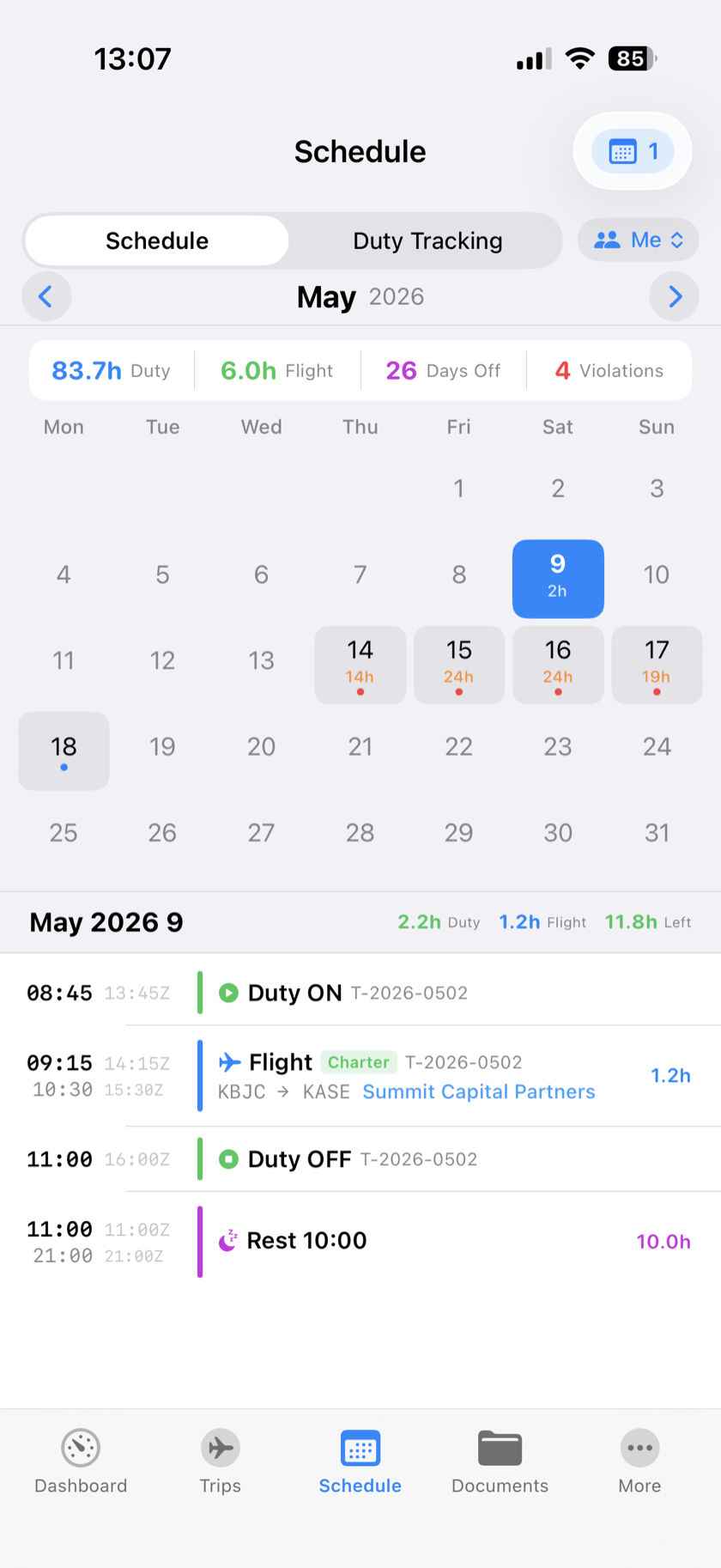
One calendar for trips, crew, and aircraft
Day, week, and month views with trips, crew availability, and aircraft maintenance blocks side by side. Conflicts surface before they become problems — duty, rest, currencies, and inspections are checked before the release button unlocks.
- Drag-and-drop scheduling across day, week, and month views
- Trips, crew availability, and aircraft blocks in one view
- Recurring availability with exception dates
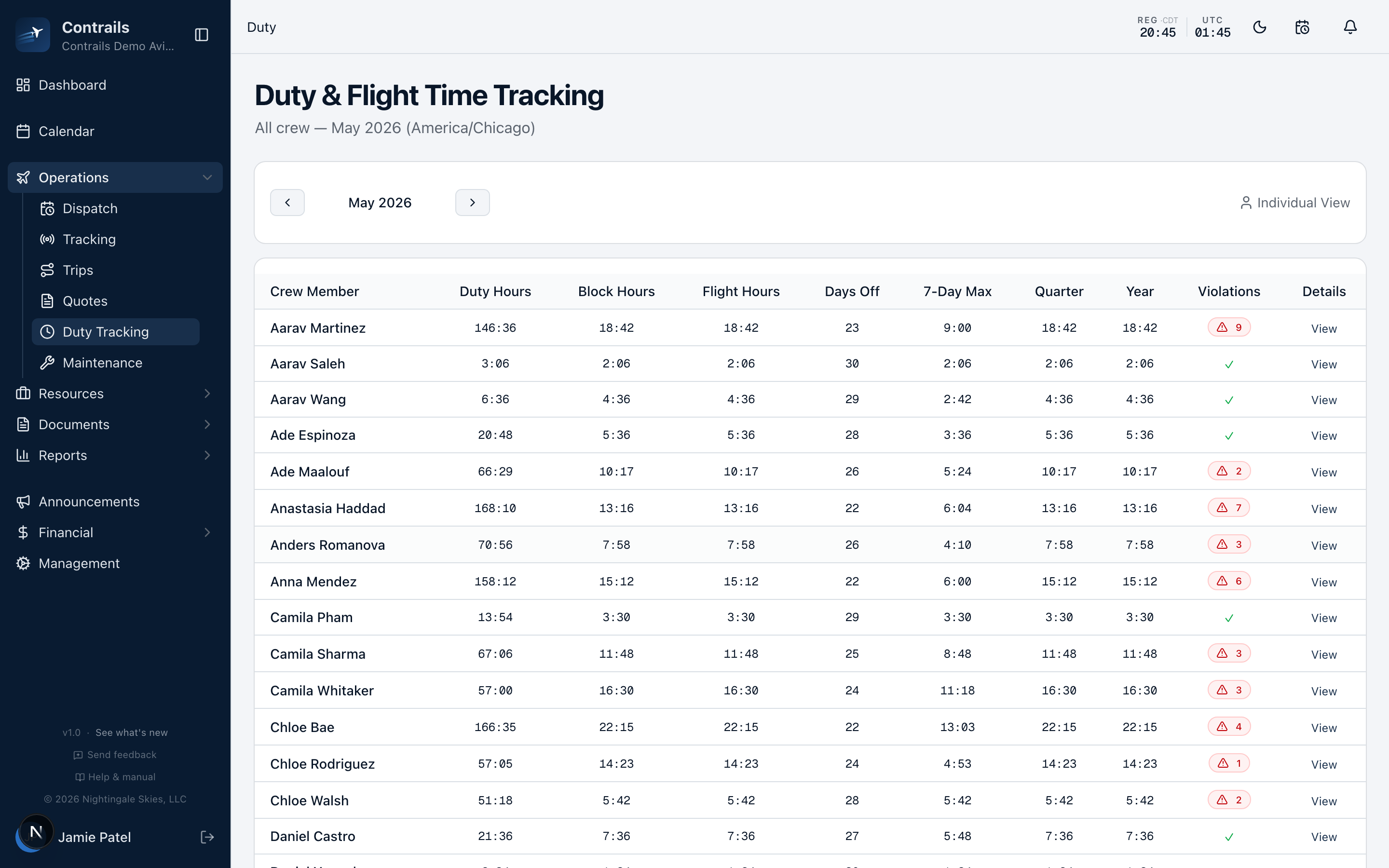
Compliance · Duty
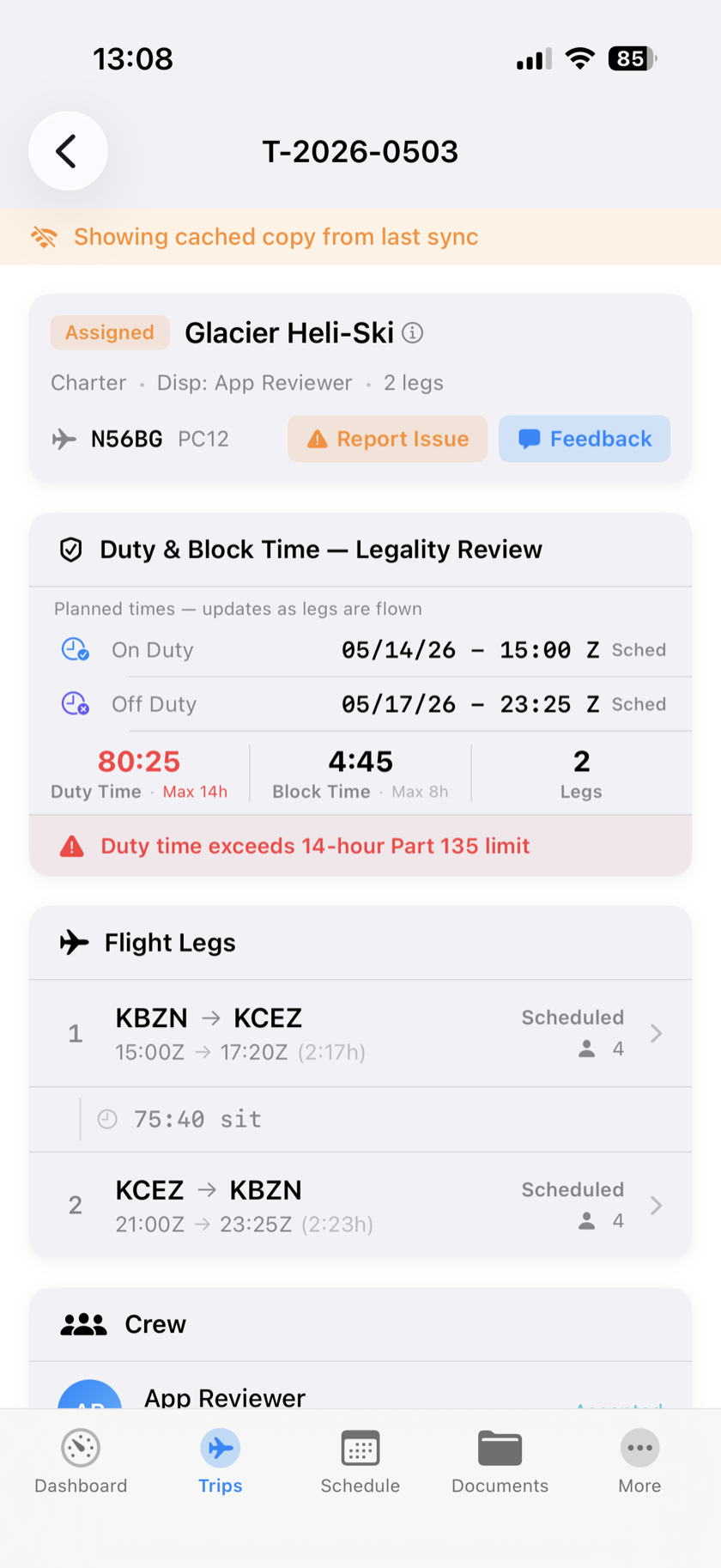
Part 135 duty tracking, automatically
Configurable Part 135 duty and rest enforcement with automatic padding before and after flights. Currencies, medicals, checkrides, and type ratings all roll into the same picture.
- Part 135 duty and rest enforcement, fully configurable
- Automatic duty padding before and after flights
- Currencies, medicals, checkrides, type ratings — one timeline
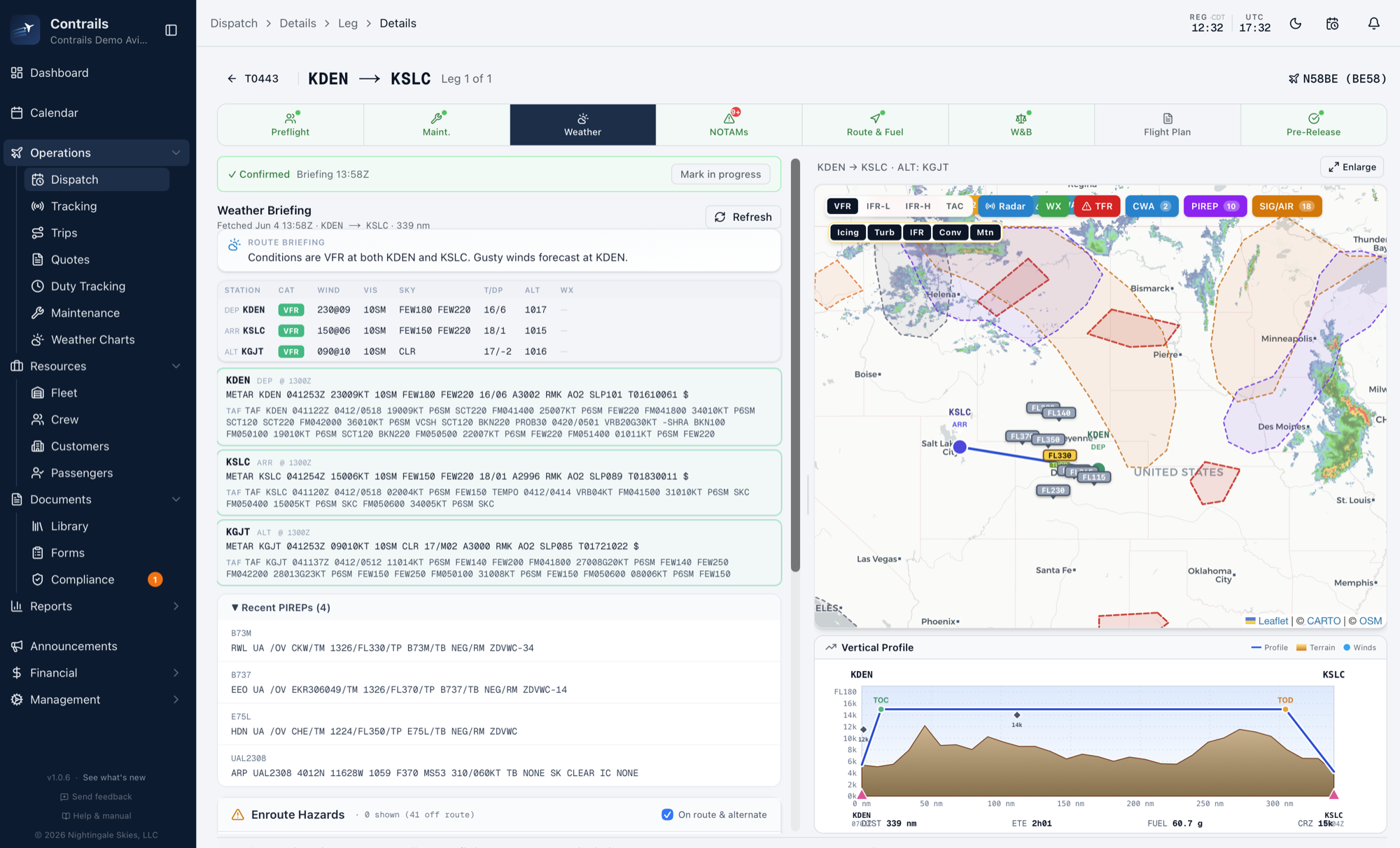
Full Dispatch Engine
A full dispatch engine, weather to signature
Every release carries a route cross-section, METARs and TAFs at departure and destination, the alternate, an enroute weather map with TFRs, and the winds aloft used in the fuel plan — captured at the time the dispatcher signs.
- Weather briefing time-stamped and archived onto the release
- Route cross-section with terrain and winds aloft
- TFR detection and NOTAM review frozen onto the dispatch
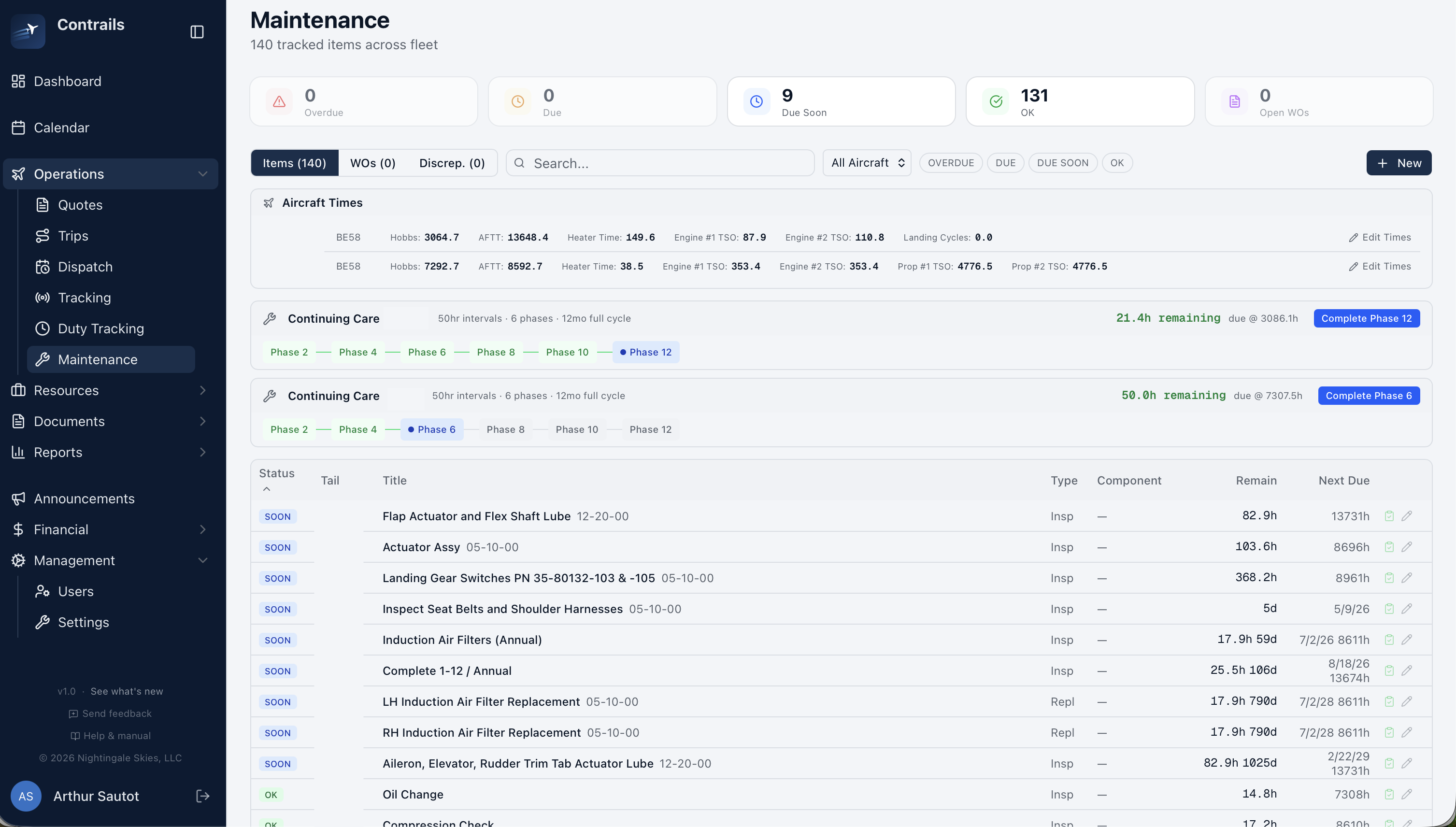
Airworthiness · Maintenance
Maintenance, MELs, and inspection blocks
Hours, cycles, and calendar inspections — with dispatch blocks that fire the moment an aircraft is out of limits. Continuing-care phase tracking, MELs, squawks, work orders with mechanic and inspector sign-off, weight & balance profiles, and POH performance tables all in the same record.
- Hours, cycles, and calendar inspections with dispatch block
- Continuing-care and progressive inspection programs, phase-based
- Work orders with mechanic and inspector sign-off
Compliance · Documents
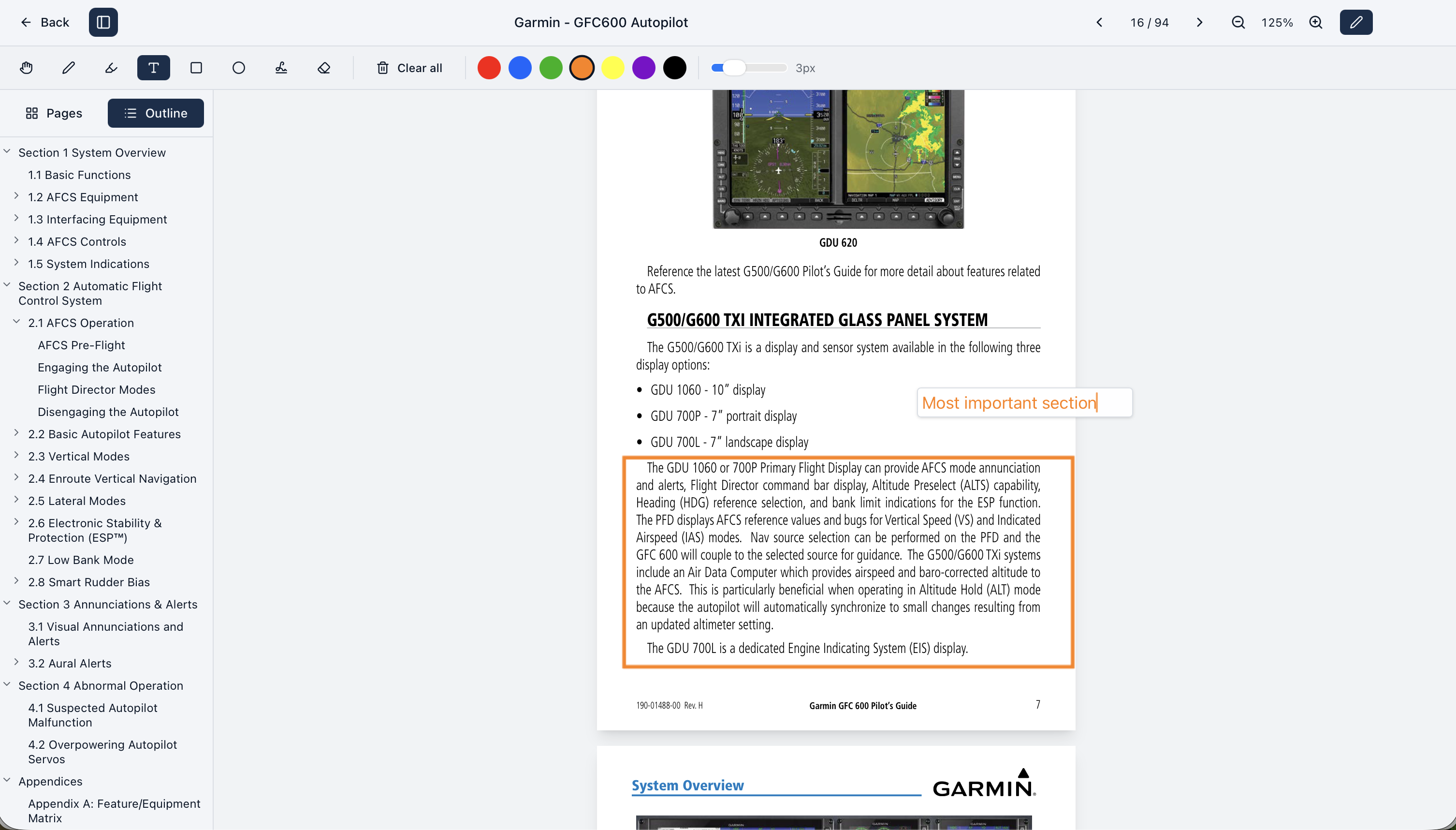
Controlled documents your organization acknowledges
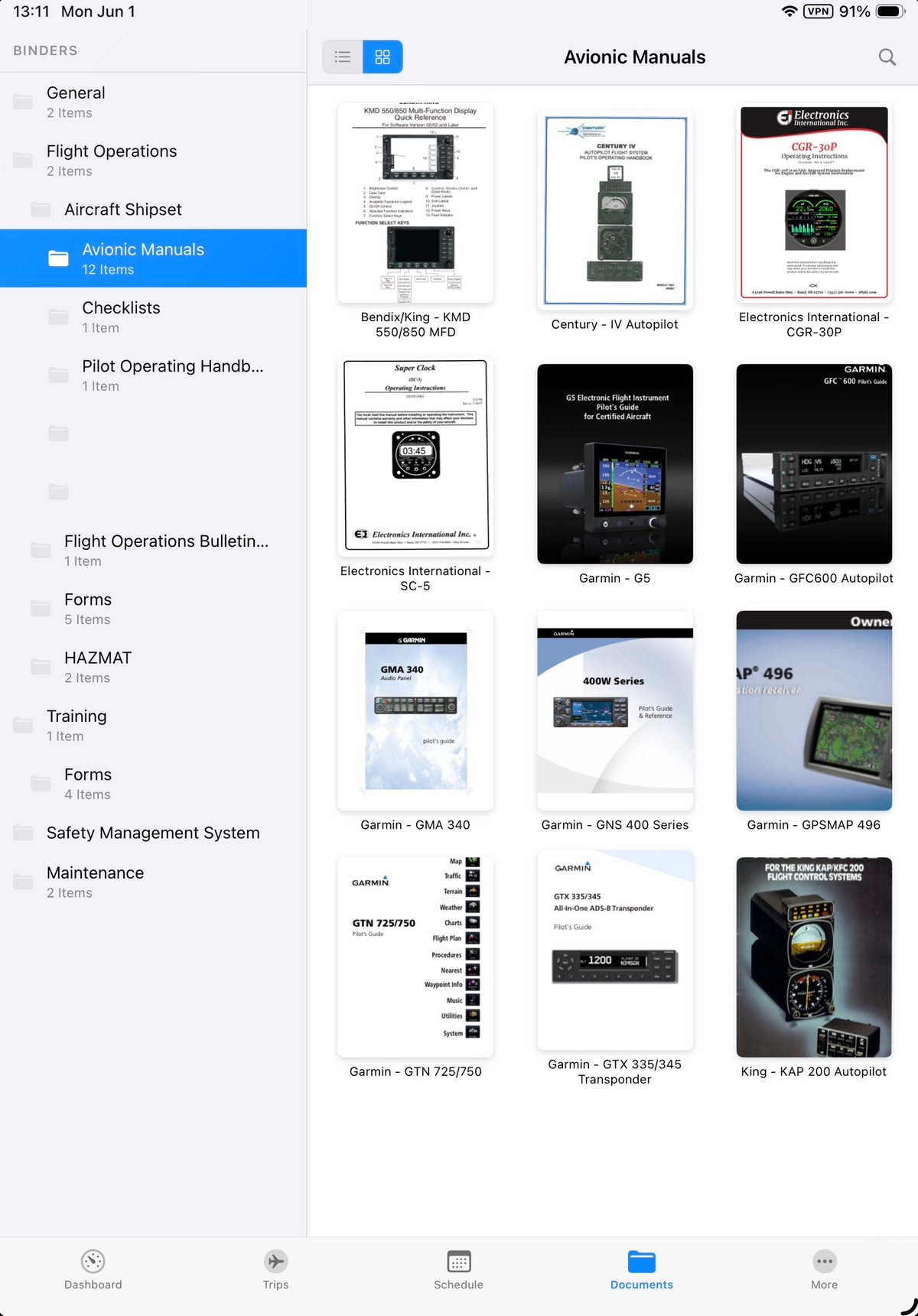
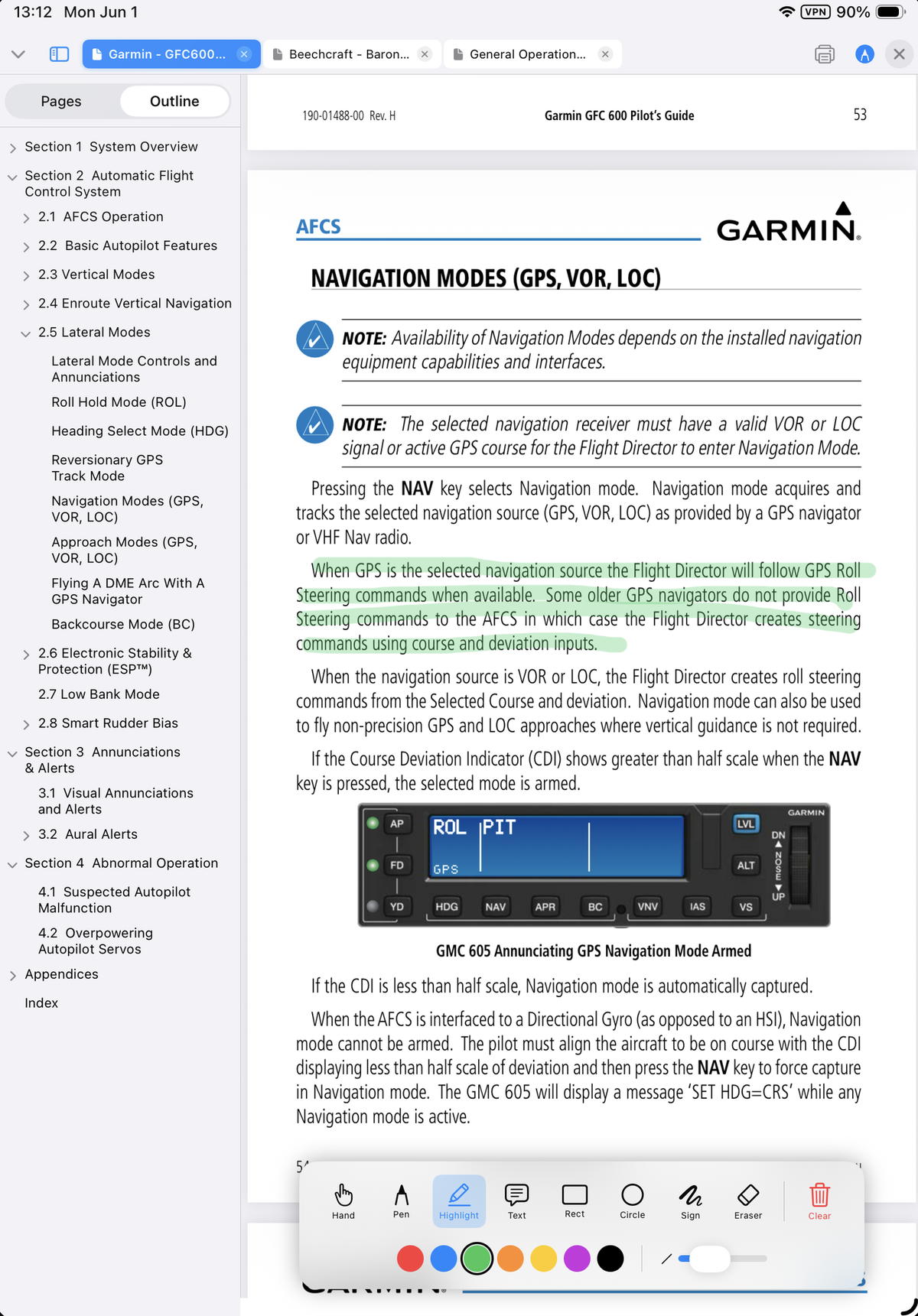
Manuals, OpSpecs, SOPs, training records, HR policies, maintenance procedures — distributed by role and department, acknowledged per recipient, available offline on the iPad. Highlight and annotate inline; admins see who has read what and who hasn't.
- Each user can highlight and annotate their own copy
- The operator decides what can be downloaded or printed, per document
- Revisions with effective dates; per-recipient acknowledgment and timestamps
- Offline access on iPad — current revisions cached without cell service
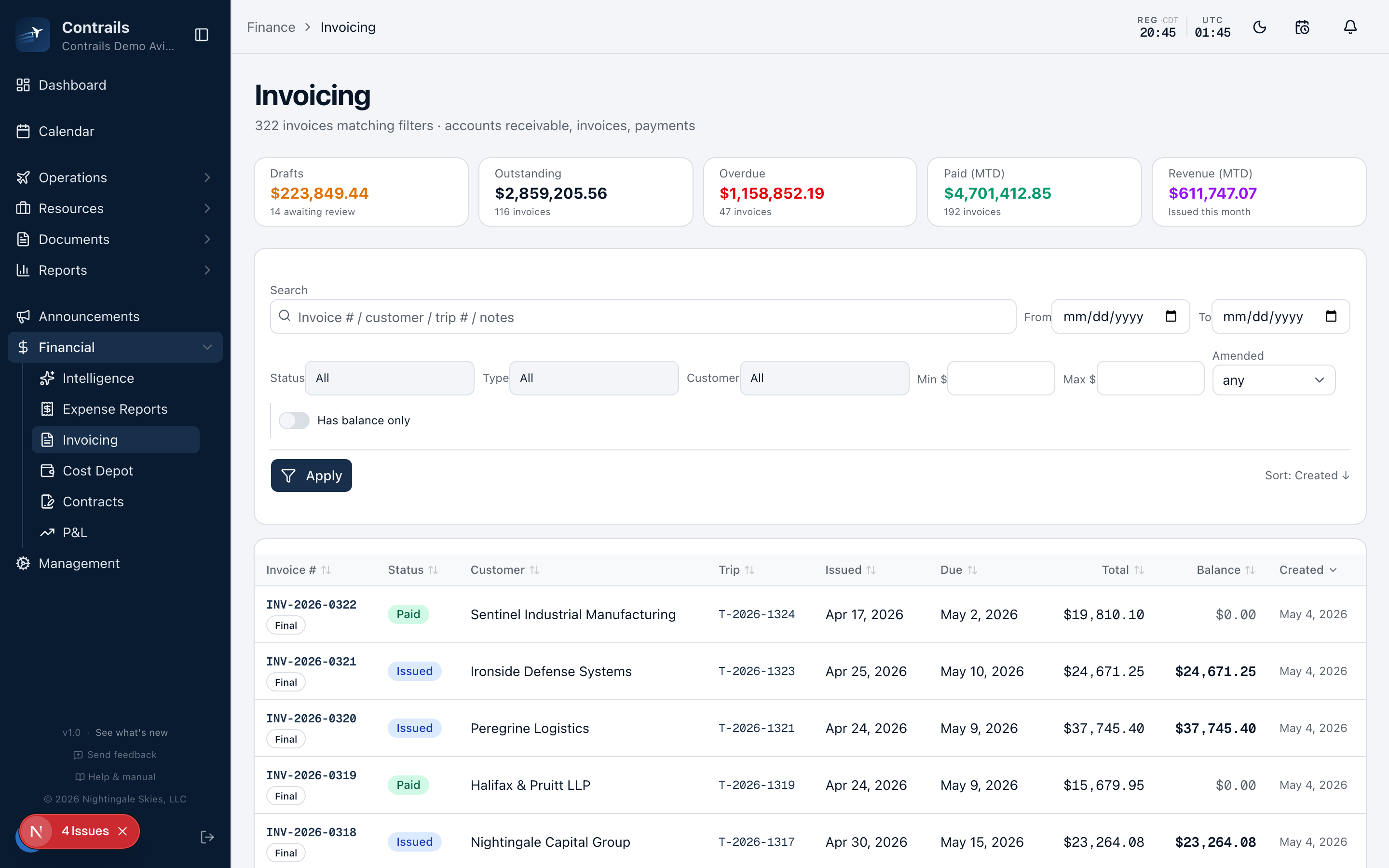
Accounting · Invoicing
Invoicing that matches the dispatch log
Deposits, final invoices, credit memos, block hours, and FET handled correctly, with two-way accounting sync so the ledger and the dispatch log agree. Pilots upload expenses from the field — no separate expense software — and each one lands on the right invoice as a pass-through line, tagged to the vendor it came from. Owners of managed aircraft get full statements for their fleet.
- Pilot expense uploads flow straight to the invoice, receipts attached to the PDF
- Owner statements for managed-fleet billing
- Payment allocation, credit ledger, two-way accounting sync
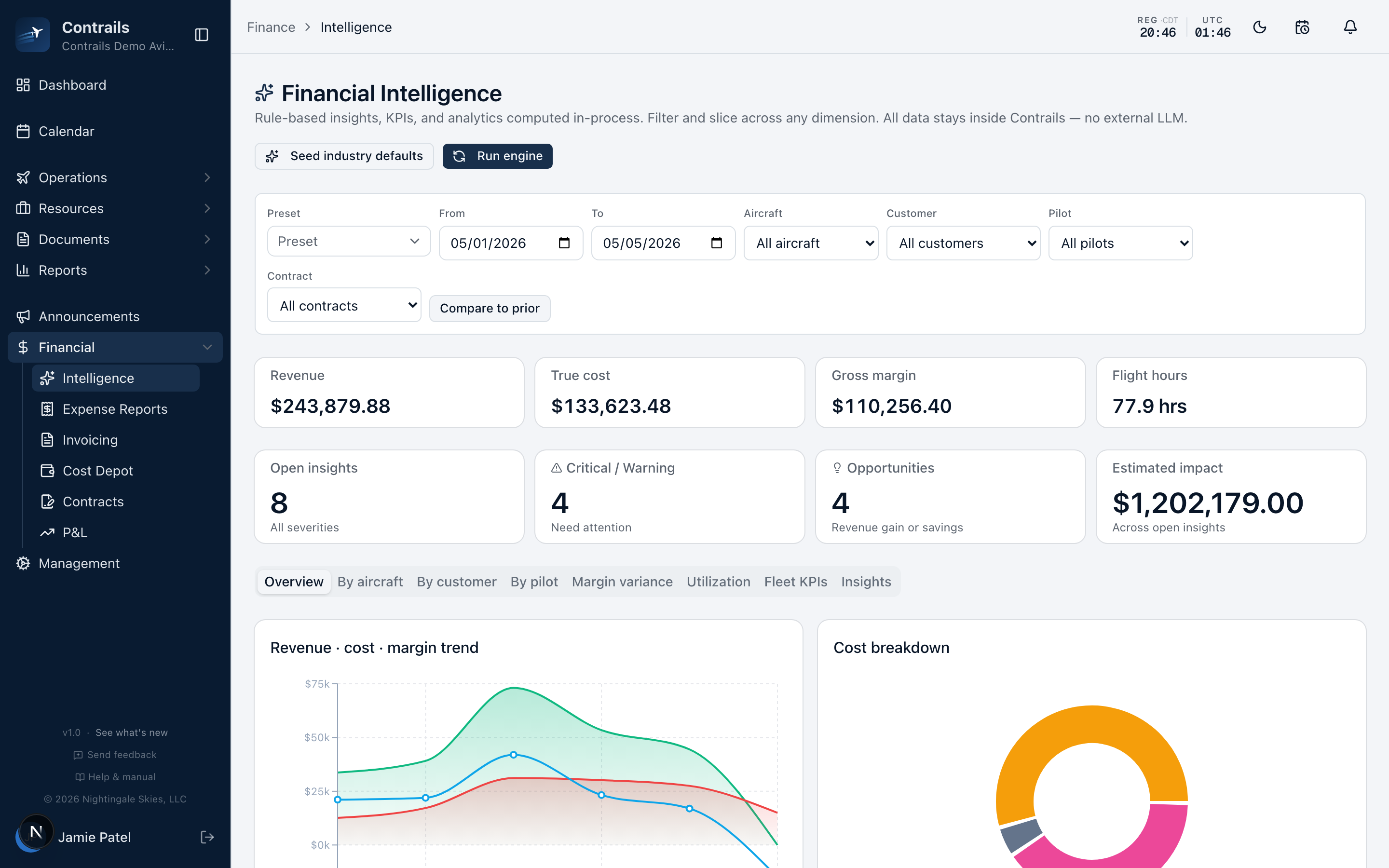
Reports · All modules
Reports for every department
Every module feeds the same reporting layer. Finance gets P&L by aircraft, customer, and period, block-hour realization, and variance against quote. Operations gets duty rolls, currency, and utilization. Compliance gets the manifest audit for FAR 135.63 and document acknowledgment status. The numbers come from the records that already closed — nothing is retyped.
- Financial intelligence: P&L, realization, variance against quote
- Operational reports: duty, currency, fleet utilization
- Compliance reports: FAR 135.63 manifest audit, acknowledgment status
The defaults follow the reg. Every value is editable.
Each limit can be set per operation, so the rules in the software match the ones in your ops specs.
- Daily duty
- 14 hours
- Single-pilot flight
- 8 hours
- Dual-pilot flight
- 10 hours
- Minimum rest
- 10 hours between duty periods
- Rolling 24-hour
- 8 hours of flight time
- Rolling 7-day
- 34 hours of flight time
- Calendar quarter
- 500 hours
- Calendar year
- 1,400 hours
- Duty padding
- 30 min before / 30 min after
Defaults shown — warnings and hard blocks fire at dispatch
Electronic records under A025. Safety records under Part 5.
OpSpec A025 — electronic recordkeeping
A025 is the authorization that lets a certificate holder keep records electronically instead of on paper. Your POI grants it after reviewing how the system handles revisions, access, signatures, audit trails, and backups. Contrails produces that evidence in the normal course of operating.
- Append-only audit logs — every change, every actor, timestamped
- Revisions with effective dates and per-person acknowledgment records
- Signed releases and manifest snapshots, frozen at trip close
- Current manuals cached on the iPad, readable without signal
- GOM insert package and a sample A025 OpSpec, ready for your POI
- Plain-file backups and complete export on demand
SMS — 14 CFR Part 5
The FAA’s safety management system rule now applies to Part 135. Existing certificate holders have until May 2027 to comply, and the program has to leave records — hazard reports, risk assessments, safety communications, follow-up. Contrails gives those records a place to live.
- Hazard and occurrence reporting through configurable forms
- Approval workflows with photos, signatures, and status tracking
- Safety communications distributed by role and acknowledged per person
- An audit trail that shows what was reported, reviewed, and closed
The SMS mandate will be enforced in May 2027. If you’re starting from zero, we also provide consulting to develop your certificate’s full SMS — manuals, processes, and the records to back them.
Authorization rests with your certificate and your POI — Contrails gives you the system and the records to bring to that conversation
The trip, the duty day, the squawk, and the invoice all live on one record.
Close trips the same day they land
Ops review rolls straight into accounting the moment the last leg lands. Invoice drafts generate automatically and flow to your accounting system.
Audits without the scramble
Manifest snapshots, duty rolls, dispatch releases with signatures, and currency checks recorded at release time — all exportable.
Stop double-booking
Conflict checks on dispatch look at the aircraft, crew duty and rest, currencies, and maintenance blocks before the release button unlocks. Presence dots show who else has the quote or trip open — viewing or editing — live.
Crews use it day to day
iOS app with offline sync, one-tap accept and decline, signature capture, receipts with OCR. Duty times push to a pilot's personal calendar.
Own your data
We host and run the platform; the data stays yours. Export everything whenever you want — no lock-in.
Charter, management, owner-flown — or all three.
Few fleets are one thing. Contrails is configured per aircraft, so a charter airplane, a managed airplane, and an owner-flown airplane can live on the same certificate with different billing rules, different cost flows, and different visibility.
- Per-aircraft ownership, billing, and cost-allocation setup
- Owner statements covering the full activity of each aircraft
- Pass-through expenses routed to the right party automatically
- Owner visibility scoped to their aircraft — nothing else
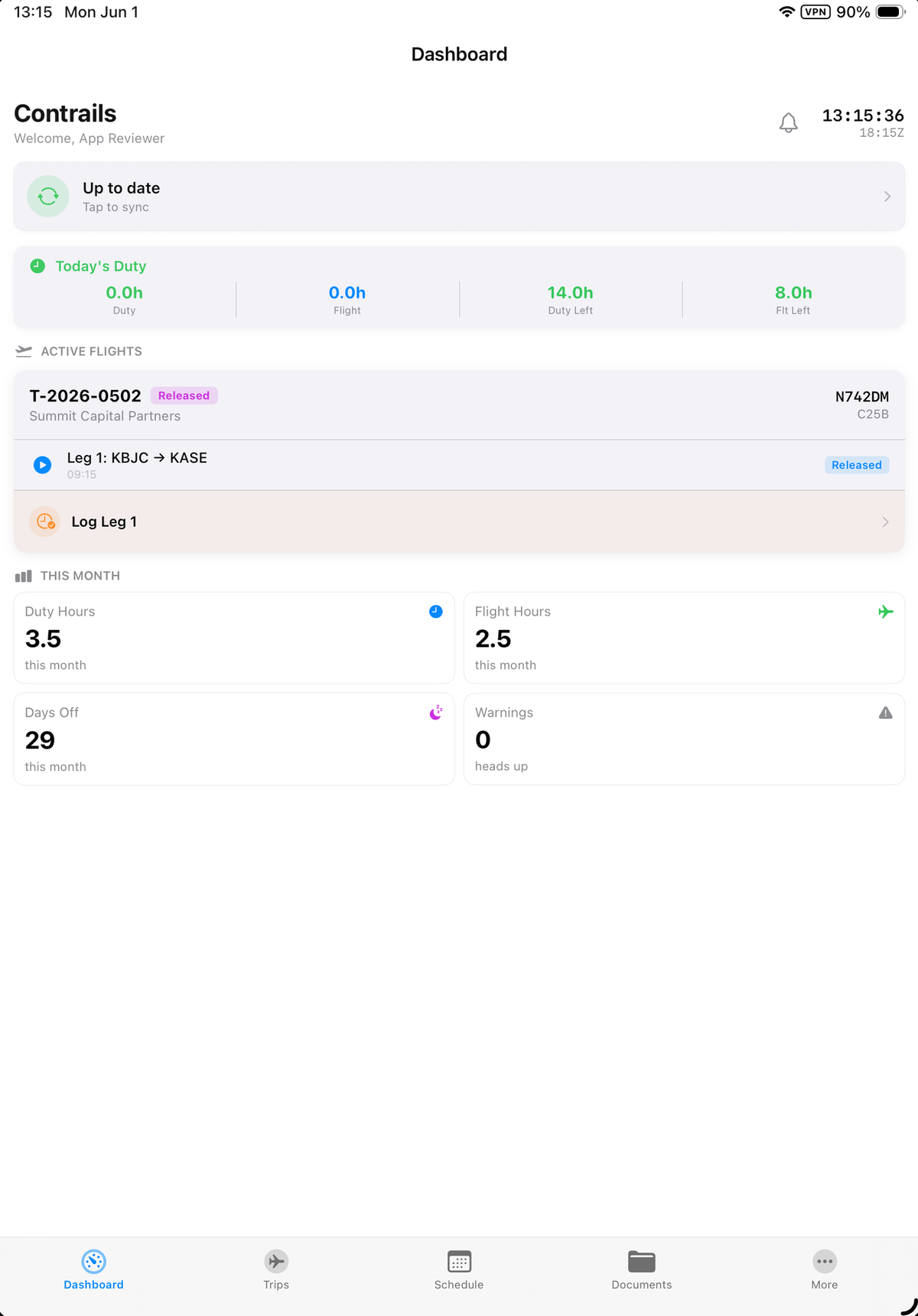
The whole duty day, on the device.
Everything a pilot needs to complete a duty day rides on the app: trips, loads, passenger names, airports, FBOs, customer and passenger feedback, and duty times — with full offline sync, so it all works with the LTE off in cruise. Dispatch runs on the device too: a release can go end to end from the iPad.
- Full dispatch on iPhone and iPad — weather, weight & balance, ICAO filing, signature release
- Offline-first: full trip and document cache
- One-tap accept and decline, signature capture
- Receipts with OCR for expense reimbursement
- Duty hours pushable to a personal Google Calendar
Twenty-two modules. One shared record.
Operations & Trips
Quote to closeout, multi-leg, signed releases
Calendar & Scheduling
Trips, crew, aircraft in one view
Duty Tracking
Part 135 compliance without the spreadsheet
Crew Management
Currencies, medicals, authorizations
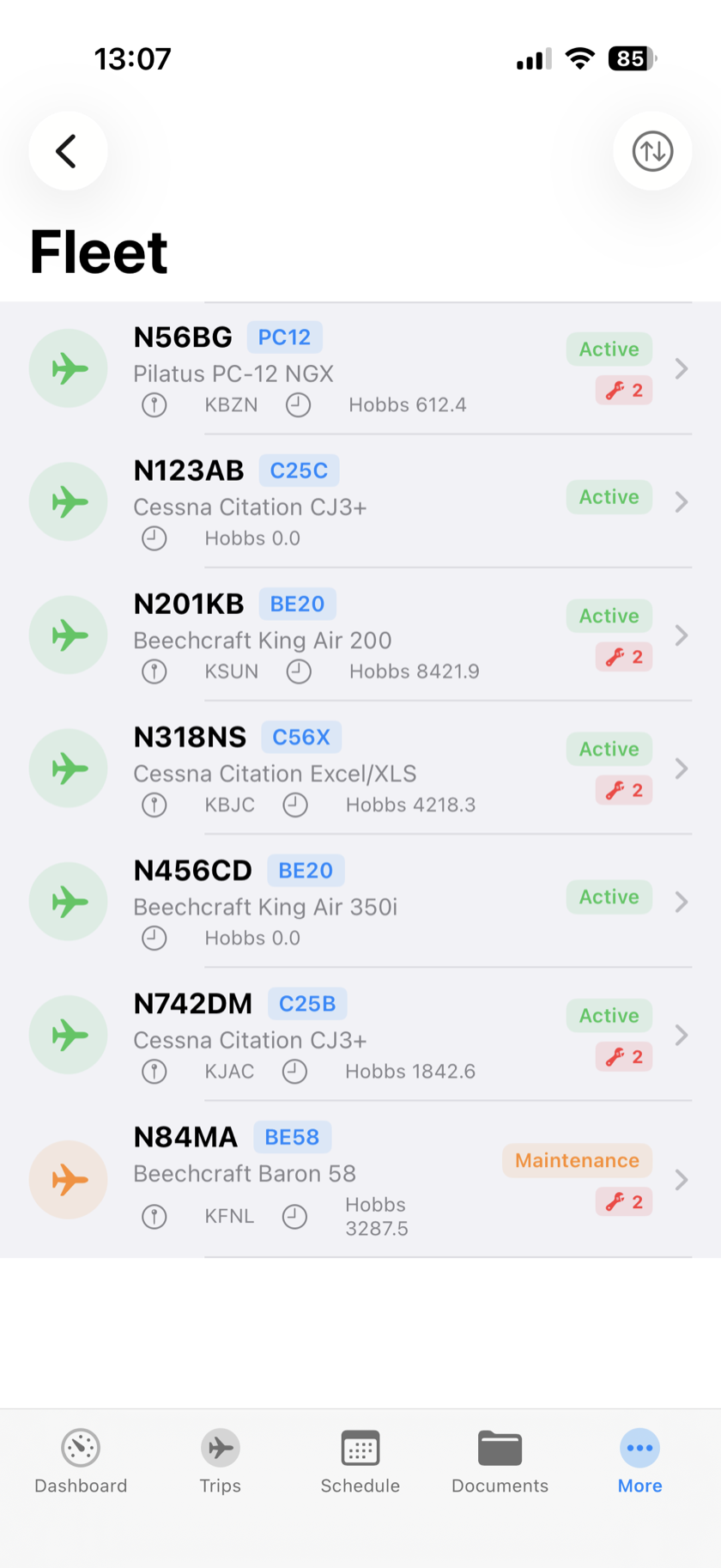
Aircraft & Fleet
Ownership, performance, ICAO filing data
Maintenance
Inspections, MELs, squawks, work orders
Weight & Balance
Profiles, envelopes, POH performance tables
Dispatch & Flight Ops
Releases, routes, NOTAMs, tracking
Customers
Accounts, terms, itemization, credit balance
Quoting & Pricing
Web requests, signed-link customer portal, FET engine
Invoicing & Accounting
Invoices, payments, block hours, credits
QuickBooks Integration
QuickBooks Online and Desktop, two-way
Google Calendar Sync
Trips and duty in a pilot's own calendar
Expenses & Reimbursement
Receipt OCR, approval, cost-center push
Documents
SOP library, revisions, acknowledgment
Forms & Surveys
Custom checklists, recurring assignments
Analytics & Reporting
Finance, operations, manifest audit
Notifications & Alerts
In-app, email, activity-driven rules
Mobile App (iOS)
Pilots and crew, offline-first
Audit Trails
Every change, every actor, append-only
Roles & Security
Access control, sign-in, passkeys
Configuration & Deployment
Multi-operation, branding, hosting
Connected where your operation already works.
Each instance is configured for its operator. Tell us which systems your departments rely on, and we custom-build the integrations you need — wherever the provider makes it possible.
- Scheduling
- Trips and duty in each crew member's personal calendar
- Accounting
- Two-way sync with the operator's accounting system
- Flight planning
- Filing through established flight-plan providers
- Weather & NOTAMs
- Live briefing data, TFRs, and winds aloft on the release
- Tracking
- Live position feeds and recorded flight history
- Fuel
- Per-airport pricing with manual override
- Email & notifications
- Connected to the operator's own email platform
- Identity
- Password, two-factor, and passkey sign-in
Modeled on how a flight department runs.
Customize them, add your own, or grant individual permissions per user.
- Admin
- Full system access
- Director of Operations
- Operations leadership
- Director of Maintenance
- Maintenance leadership
- Chief Pilot
- Captain-in-command authority
- Dispatcher
- Trip dispatch and release
- Pilot
- Crew member
- Flight Attendant
- Cabin crew
- Mechanic
- Maintenance work
- Compliance Officer
- Documents and audit oversight
- Accountant
- Invoicing and finance
Permissions are named — manage documents, authorize dispatch, manage invoices, approve expenses, run manifest audit — and assignable to roles or individual users.
We run it. The data is yours.
Contrails is hosted and managed by us — one isolated tenant per operation, branded to yours. Web for the office, iOS for the crew. You can export everything, any time.
Web app
For ops, scheduling, dispatch, accounting, compliance — every back-office role.
iOS + PWA
For pilots and crew, with offline sync, signature capture, receipts with OCR.
Managed hosting
One isolated tenant per operation, run and updated by us. Backups are plain files; full export any time.
Switching from another system?
Your history comes with you.
We’ll do our best to transfer your data from your previous management software free of charge — customers, aircraft, crew records, and trip history — so Contrails starts with your past operation already in it, not an empty database.
Security posture
- Industry-standard password protection
- Passkeys for phishing-resistant multi-factor authentication
- Append-only audit logs with actor, IP, user agent, platform
- Encrypted session tokens; mobile payloads encrypted on device
- Per-operation data isolation in a multi-tenant install
- Manifest snapshots frozen at trip close — FAA-facing artifacts
See it run, by appointment.
Forty-five minutes, screen share, no slides. We walk a working demo operation end to end — quote, trip, release, invoice — and map it to how you fly.